
Doppelganger - Duplicate File Finder1.0.3 - Download
You'll be able to download in few seconds.
Publisher Description
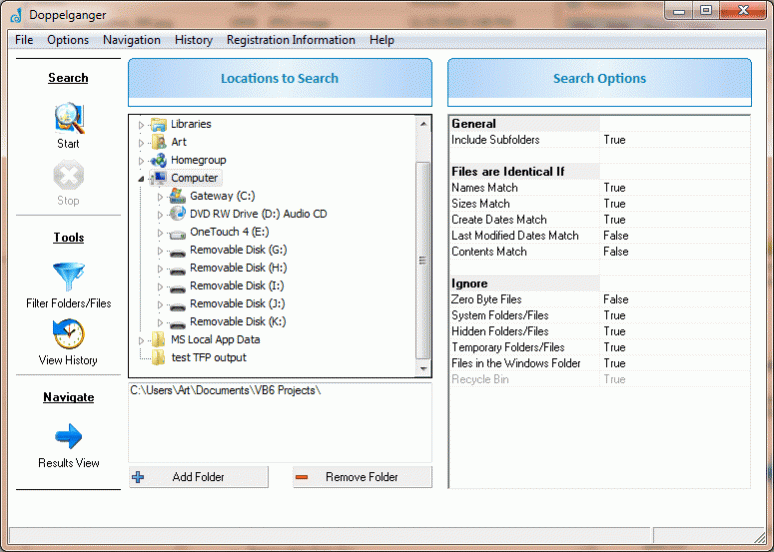
Doppelganger is a powerful and reliable tool to find and remove duplicate pictures, documents, music files, and more! Removing duplicates frees up disk space and aids your computer in indexing. If you backup your files, removing duplicates first reduces the storage space required for the backups and the amount of time required to perform the backup.
Most people are not aware of how many duplicate files reside on their computer and how much space these duplicate files are taking up. Doppelganger locates the duplicate files on your computer. It can find matching files even if their names are different! Once found, Doppelganger can also help you safely remove these duplicates.
Doppelganger is based on the duplicate file finder functionality in our software FolderMatch. As such, it has over a decade of Windows file system knowledge and experience behind it. Its core programming code has been tested and refined by the feedback of millions of users. It's rock solid and you can trust your data to it. It's also FAST! In all of our testing of comparable software, it's one of the fastest we've found.
Search for duplicates based on file name, size, date/times, and/or contents. Specific files and folders can be excluded from the search. Once found, the duplicate files can be treated in several ways: they can be moved to another folder, or sent to the Windows Recycle Bin, or they can be deleted permanently.
About Doppelganger - Duplicate File Finder
This File & Disk Management program is available in English. It was last updated on 31 October, 2026. Doppelganger - Duplicate File Finder is compatible with the following operating systems: Windows.
The company that develops Doppelganger - Duplicate File Finder is Salty Brine Software. The latest version released by its developer is 1.0.3.
The download we have available for Doppelganger - Duplicate File Finder has a file size of 5.2 MB. Just click the green Download button above to start the downloading process. The program is listed on our website since 2012-07-04 and was downloaded 0 times. We have already checked if the download link is safe, however for your own protection we recommend that you scan the downloaded software with your antivirus. Your antivirus may detect the Doppelganger - Duplicate File Finder as malware if the download link is broken.
How to install Doppelganger - Duplicate File Finder on your Windows device:
- Click on the Download button on our website. This will start the download from the website of the developer.
- Once the Doppelganger - Duplicate File Finder is downloaded click on it to start the setup process (assuming you are on a desktop computer).
- When the installation is finished you should be able to see and run the program.
Program Details
System requirements
Download information
Pricing
Version History
version 1.0.3
posted on 2012-07-04
NEW: Added ability to specify type of files to search on (Audio, Video, Documents, Pictures) and more - Please see website for detailed information
version 1.0.1
posted on 2011-08-15
Please see website for detailed information
Disclaimer
External Download
We do not host Doppelganger - Duplicate File Finder on our servers. We did not scan it for viruses, adware, spyware or other type of malware. This app is hosted by the software publisher and passed their terms and conditions to be listed there. We recommend caution when installing it.
The external download link for Doppelganger - Duplicate File Finder is provided to you by apps112.com without any warranties, representations or guarantees of any kind, so access it at your own risk.
If you have questions regarding this particular app contact the publisher directly. For questions about the functionalities of apps112.com contact us.
